How it works Features Pricing FAQ Sign in Start free with 5 items
Gear tracking for film crews

Where’s your gear? Daddy knows.

QR labels and a phone scanner for film crews. Always know what’s home, on the truck, on set or out, and who has it.

Sign in with Google. No credit card for the free plan.
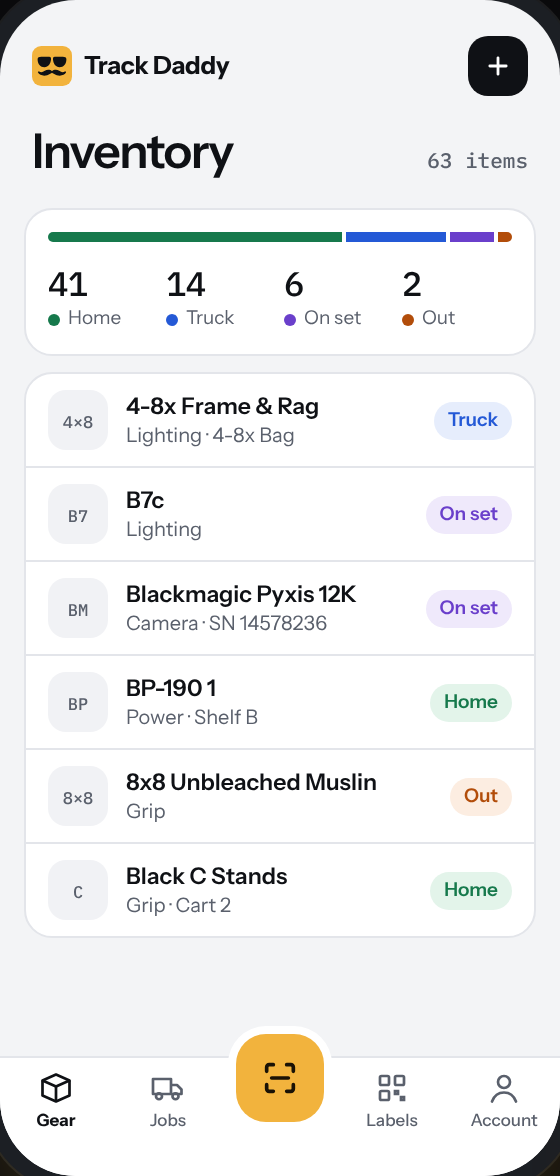
Inventory screen: 63 items, 41 home, 14 on the truck, 6 on set, 2 out, with a list of gear and status chips
Scan sessions

Scan it out. Scan it home.

Pick Load, On set, Return or Check out and point your phone at a label. Two beeps and it’s logged. Nothing to install.

Works in any phone browser.
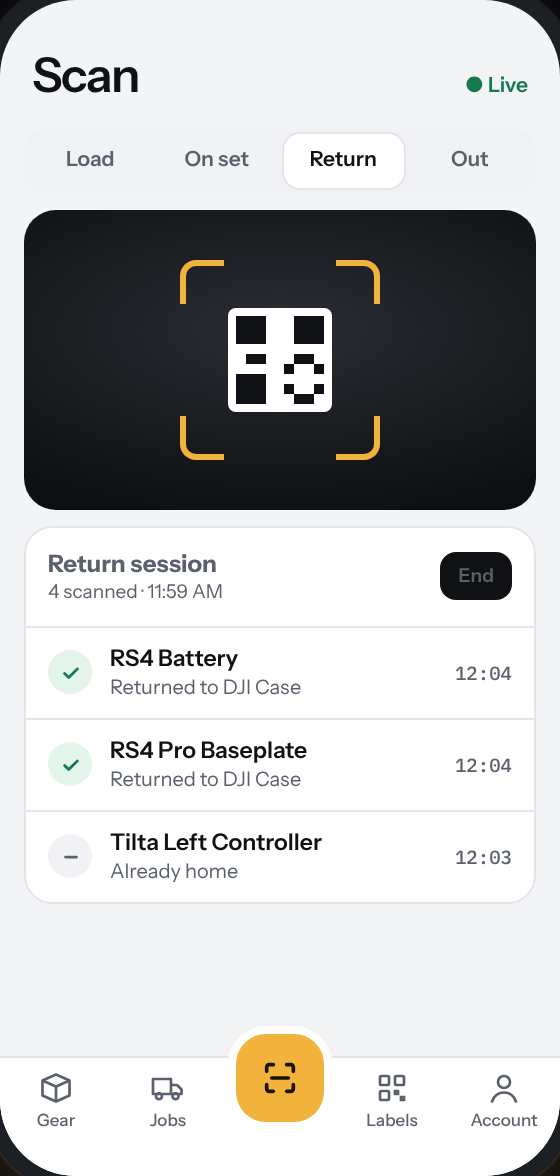
Scan screen in Return mode: the camera viewfinder and a session list of items just scanned home
Jobs

Wrap without the roll call.

Every job tracks what went out on the truck. At wrap, scan it all home and Track Daddy shows you the stragglers before you close the job.

Sample job shown.
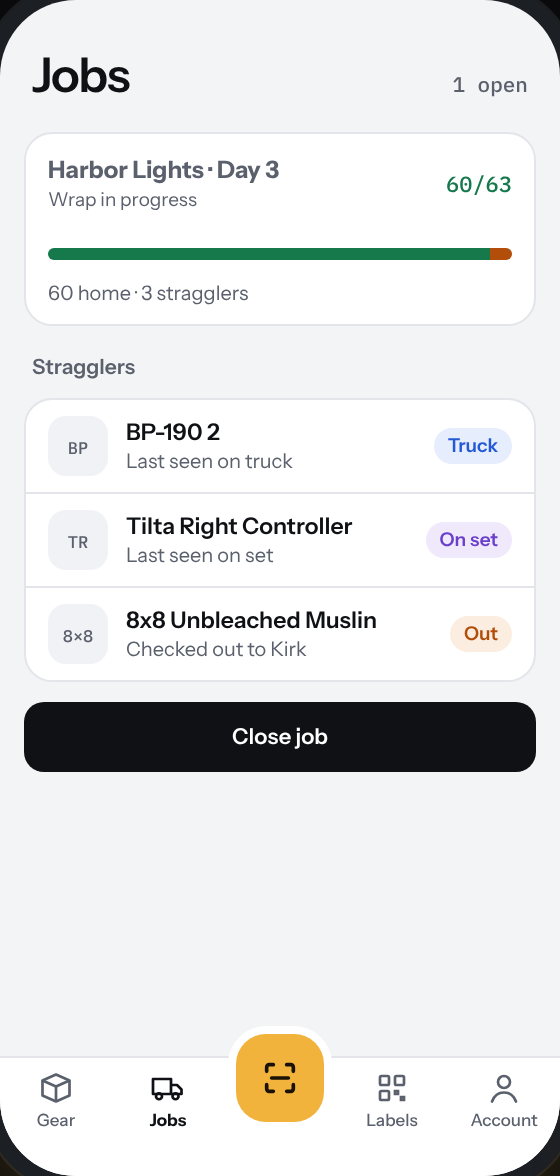
Jobs screen: Harbor Lights Day 3, 60 of 63 items home and three stragglers listed
QR labels

Label the whole cage in an afternoon.

Print labels in four sizes on sticker paper, or plain paper and tape. Tiny ones fit batteries, cables and cards.

Any printer works.
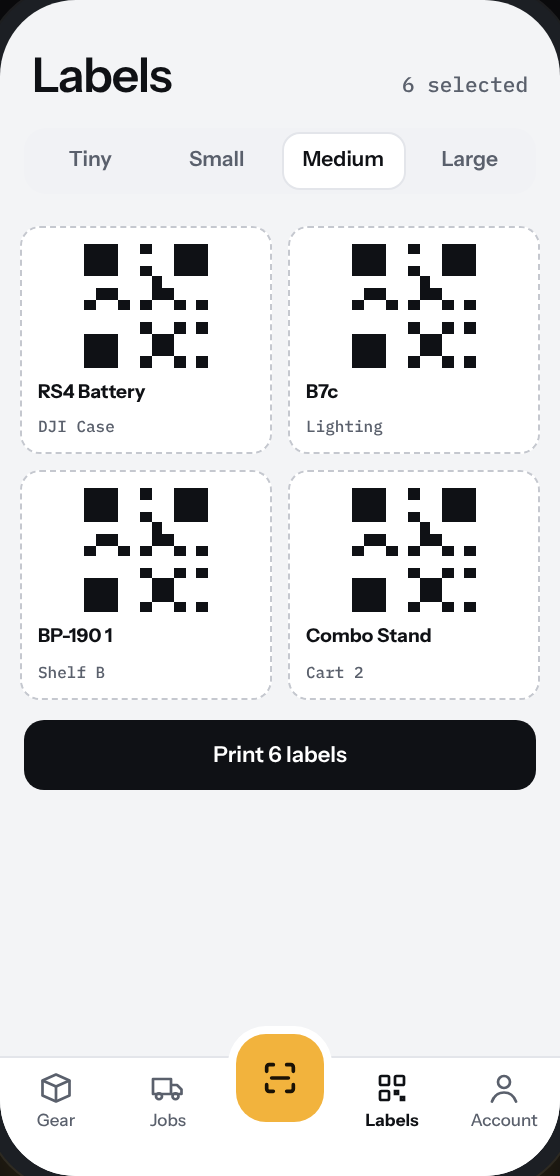
Labels screen: four medium QR labels selected and a Print button
How it works

Label it. Scan it. Know it.

01

Label it

Add your gear and print a QR label for every case, light and cable. Four sizes, sticker paper or plain paper and tape.

02

Scan it

Load the truck, mark what’s on set, and scan everything back home. Your phone beeps twice for every item logged.

03

Know it

See what’s home, on the truck, on set or out, live, for your whole crew. Search any item by name, serial or shelf.

Features

Built for the cage, the truck and the set.

Jobs

Build a load-out for each shoot and see exactly what’s on the truck.

Scan sessions

Rapid-fire scanning with sound feedback. Every scan saves automatically.

QR labels

Print Tiny, Small, Medium or Large labels from any printer.

Your crew

Add coworkers by Google email. You decide who can open your inventory.

Search everything

Find any item by name, serial number or shelf location.

Light and dark mode

Easy to read in a bright cage or on a dark stage. Follows your phone.

Pricing

Start free. Upgrade when the kit grows.

Free
$0

Try it on your own kit.

Start free
  • Track up to 5 items
  • Scan in and out
  • QR labels on any printer
  • Works on any phone
Indie
$1.99/mo

A one-person kit that fits in a car.

  • Track up to 25 items
  • Just you
  • Jobs and truck tracking
  • QR labels and spreadsheet import
Indie Pro
$4.99/mo

Same simple setup, twice the room.

  • Track up to 50 items
  • Just you
  • Jobs and truck tracking
  • QR labels and spreadsheet import
Studio
$9.99/mo

An owner-operator with a full cage.

  • Unlimited items
  • Just you
  • Jobs and truck tracking
  • QR labels and spreadsheet import
  • Rentals with due dates
  • AirTag and Tile tracking
  • Exports for Canva and print shops
Studio ProMost crews
$14.99/mo

A small department that shares one truck.

  • Unlimited items
  • Up to 3 crew members
  • Jobs and truck tracking
  • QR labels and spreadsheet import
  • Rentals with due dates
  • AirTag and Tile tracking
  • Exports for Canva and print shops
Studio Pro+
$29.99/mo

Rental houses and full G&E crews.

  • Unlimited items
  • Up to 10 crew members
  • Jobs and truck tracking
  • QR labels and spreadsheet import
  • Rentals with due dates
  • AirTag and Tile tracking
  • Exports for Canva and print shops
  • Priority support

Secure checkout by Stripe. Change or cancel from your account anytime.

FAQ

Questions from the cage.

Do I need to download an app?

No. Track Daddy runs in your phone’s browser and uses the camera to scan. Add it to your home screen if you want an app icon.

What do I print the labels on?

Sticker paper works best, but plain paper and tape is fine. Pick from four label sizes, from tiny ones for batteries and cards up to large ones for cases.

Can my whole crew use it?

Yes. Add coworkers by their Google email. Only people you list can open your inventory, and everyone sees the same live status.

What happens after 5 items?

The free plan tracks up to 5 items. Pick a paid plan here or from your account, and everything you already added stays put.

Can I cancel anytime?

Yes. Manage or cancel your plan from the Account page. Payments are handled by Stripe.

Where’s your gear?
Daddy knows.

Start free with 5 items
Checkout

Get Track Daddy Pro

Pro · billed monthly$0/mo
1Sign in2Pay with Stripe3Open the app

Sign in with the Google account your crew will use. Your plan is tied to it.